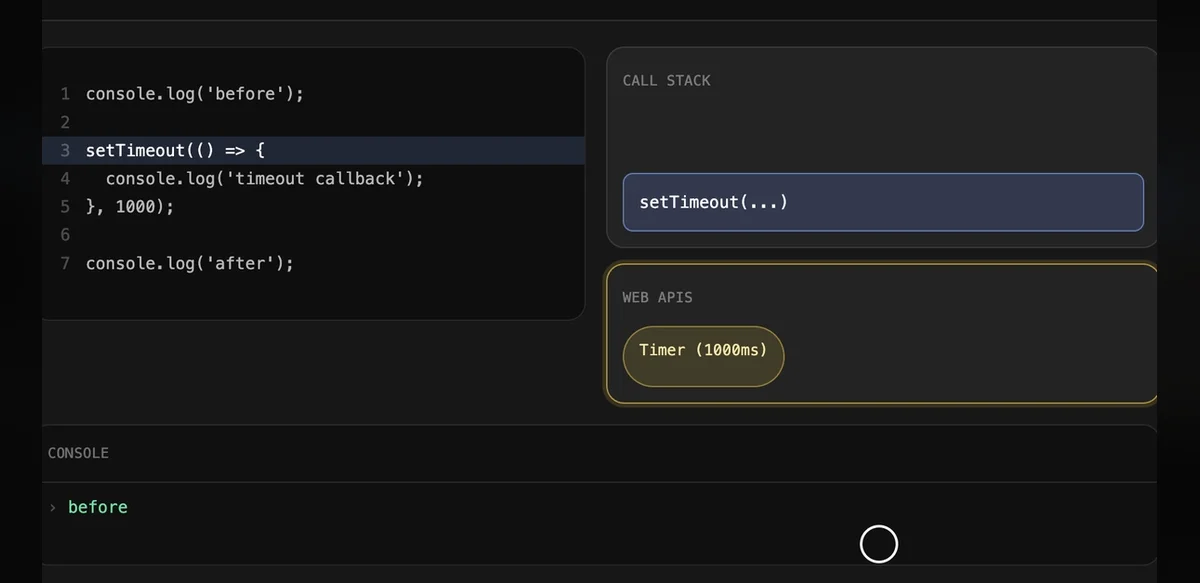
The JavaScript programming language depends on a core mechanism called the event loop to manage operations that occur outside the main execution path. This system allows applications to handle multiple tasks without interrupting the primary thread of execution. Developers often rely on visual representations to grasp how this process unfolds in practice.
At its foundation the event loop coordinates between several components including the call stack the task queue and browser provided interfaces. When a function is invoked it enters the call stack and runs to completion before the next item can proceed. Asynchronous actions such as network requests or timers are delegated to separate environments and their results are placed into queues for later processing.
Visual tools typically depict the call stack as a vertical list that grows and shrinks with each function call. Meanwhile the queue appears as a horizontal line where callbacks wait their turn. Arrows between these elements show how completed operations move results back into the main flow. Such diagrams help clarify why certain code segments execute in unexpected orders.
One common scenario involves a timer set for zero milliseconds. Although the delay suggests immediate execution the callback still enters the queue and waits until the stack clears. This behavior ensures that the main thread remains responsive to user interactions and other events. Visualizations often highlight this delay by showing the timer result lingering in the queue while other tasks finish.
The event loop also interacts with more advanced features such as promises and mutation observers. These create microtasks that receive priority over regular callbacks. Diagrams frequently use separate lanes or colors to distinguish microtasks from standard tasks illustrating their faster processing path. This distinction prevents certain operations from being starved by longer running code.
Historical context reveals that the event loop concept predates modern web development and draws from earlier models in operating systems. JavaScript adopted and adapted the approach to suit single threaded browser environments. Over time updates to language specifications have refined how queues and priorities function leading to more predictable behavior across different implementations.
Educators use interactive visuals to let learners step through sample code and observe changes in real time. Users can pause execution inspect the current state of the stack and queue and predict the next action. These exercises build intuition about concurrency without requiring deep knowledge of underlying engine details.
Common misconceptions arise when developers assume that asynchronous code runs in parallel threads. In reality JavaScript maintains a single thread while the event loop orchestrates deferred work. Visual aids address this by emphasizing the sequential nature of stack processing even as external operations occur simultaneously in the background.
Performance considerations also benefit from understanding the event loop. Long running tasks can block the queue and cause interface lag. Visualizations sometimes include timing indicators that show how blocking code delays subsequent callbacks. Developers can then refactor such code into smaller asynchronous chunks to maintain smooth operation.
Cross platform differences occasionally affect event loop behavior particularly in server side environments versus browsers. Node.js implements its own version with additional queues for input output operations. Comparative diagrams help illustrate these variations and guide developers when writing portable code.
Community resources frequently share updated visuals as language features evolve. New additions such as async functions integrate seamlessly with the existing loop structure yet require clear explanations to avoid confusion. Updated diagrams incorporate these elements showing how they translate into promise based microtasks.
Overall the event loop remains a foundational topic for anyone working with JavaScript. Visual explanations continue to serve as effective teaching tools by breaking down complex interactions into understandable stages. As applications grow more sophisticated these aids support ongoing learning and troubleshooting efforts.
Further exploration often involves examining source code of popular libraries that rely heavily on asynchronous patterns. By tracing how they schedule tasks developers gain practical insight into real world usage. Visual models provide a consistent reference point during such investigations.
In summary the event loop enables responsive and efficient JavaScript applications through careful coordination of tasks. Visual representations demystify its operation and support both beginners and experienced practitioners in mastering this essential concept.